Church 360by Vue Ezy
Proposal Prepared for Exponential Network

Your conference and community, in your own app.

Church 360 gives Exponential an app on iPhone and Android, carrying your name and look, and a back office where your team runs every event. Registration, tickets, check-in, live sessions, replays, community and announcements all live in one place.

For
Exponential leadership team
From
Henry Duke, Vue Ezy
Date
November 2026
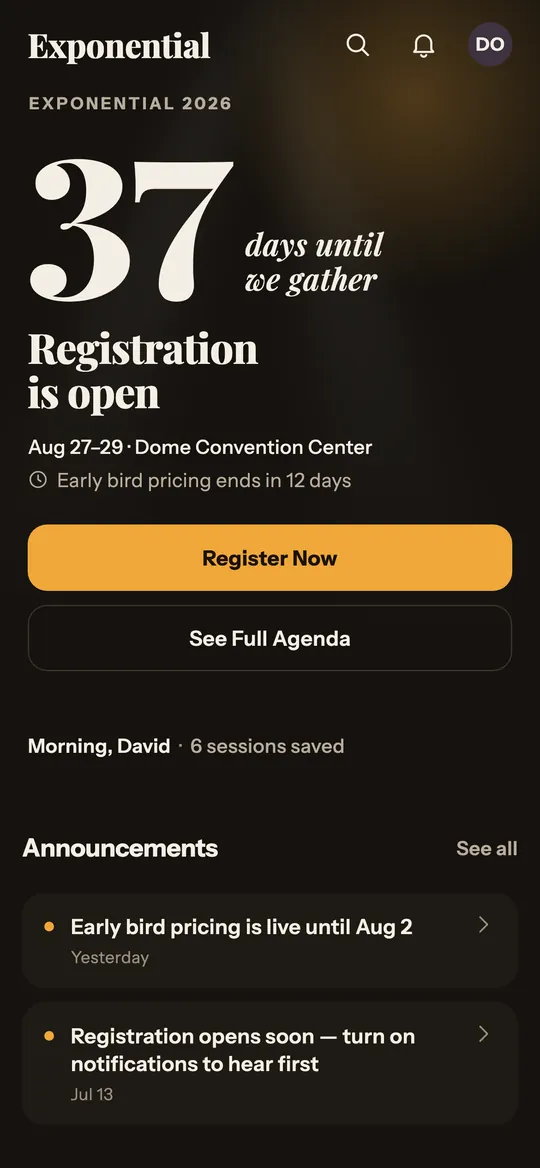
Home screen counting down to the conference with a Register Now button
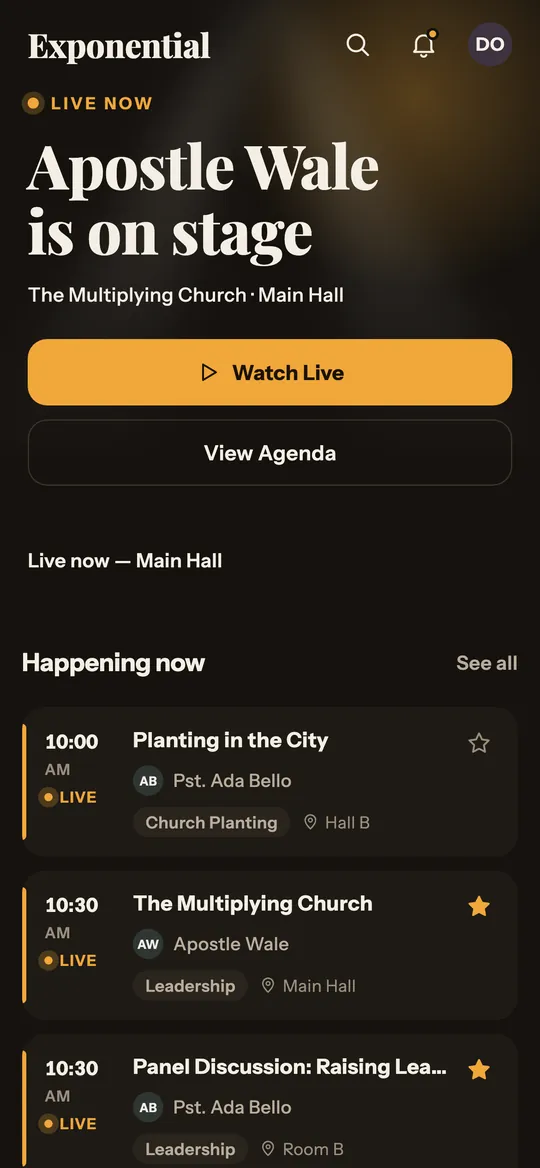
Home screen during the conference showing who is on stage now and a Watch Live button
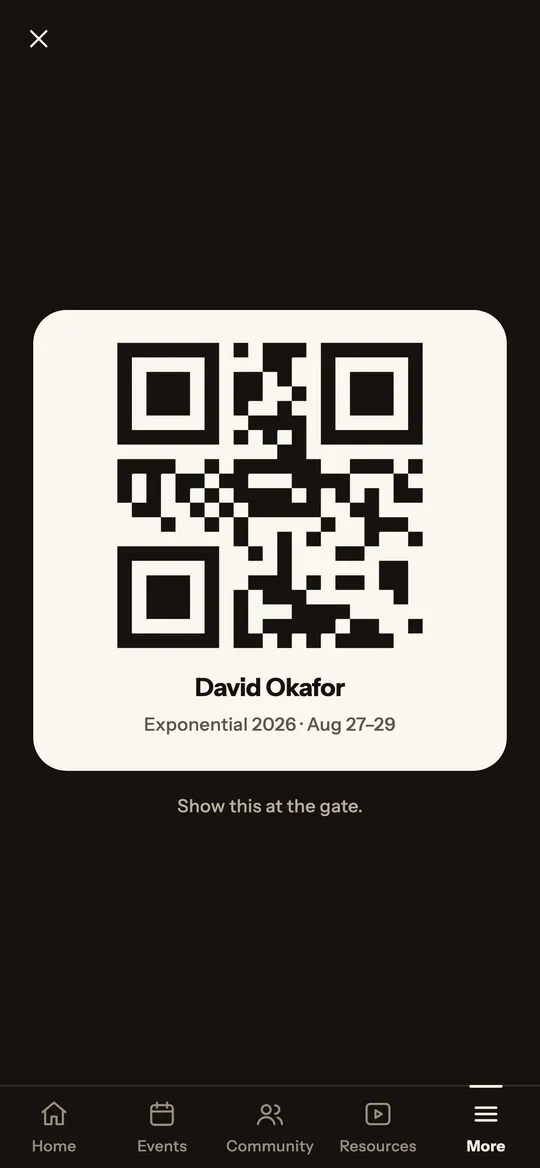
A personal QR ticket ready to show at the gate
Why this matters

One home for everything around your gatherings

Most ministries run events with a handful of tools that don't talk to each other. The team spends its energy joining them up, and members get a different experience at every step.

Today

Spread across many tools

  • Registration on a web form, then a spreadsheet to tidy.
  • Payments by bank transfer, matched up by hand.
  • Updates in several WhatsApp groups that people mute.
  • Livestream and Zoom links shared in messages and lost.
  • Check-in from a printed list at the gate.
  • After the event, the connection fades until next year.
With Church 360

One app, one back office

  • Register and pay in the app, in naira or dollars.
  • Payments reconcile themselves: every ticket shows paid, due or refunded.
  • Announcements and push notifications that reach the right people.
  • One Watch Live button that opens the stream inside the app.
  • QR tickets scanned at the gate with a phone.
  • Community spaces and replays that keep people engaged all year.
How it works

Three parts, one system

Your team works in the back office. Members use the app. Church 360 sits between them, keeps everything in step, and is run for you by Vue Ezy.

Your team

Back office

A website your staff sign in to. Create events, set prices, publish the agenda, approve registrations, scan tickets, post announcements and see the numbers.

Run by Vue Ezy

Church 360 platform

Secure cloud servers that hold your events, members, tickets and payments. Every change your team makes reaches the app straight away. We host it, back it up, update it and watch over it.

Your members

The Exponential app

On the App Store and Google Play under your name and logo. Members register, carry their ticket, follow the agenda, watch live, join conversations and catch replays.

PaymentsPaystack, Flutterwave or Stripe, using your own accounts. Money goes straight to you.
LivestreamsYouTube, Vimeo or a streaming link play inside the app. Zoom works too: see the FAQ.
NotificationsPush notifications to phones, plus an inbox in the app so nothing is missed.
One event, start to finish

Exponential Conference 2027, through the app

The app changes with the calendar. Months before, it counts down and sells tickets. On the day, it shows what is happening now. Afterwards, it hands people the replays and keeps the conversation going.

Before

Register and get ready

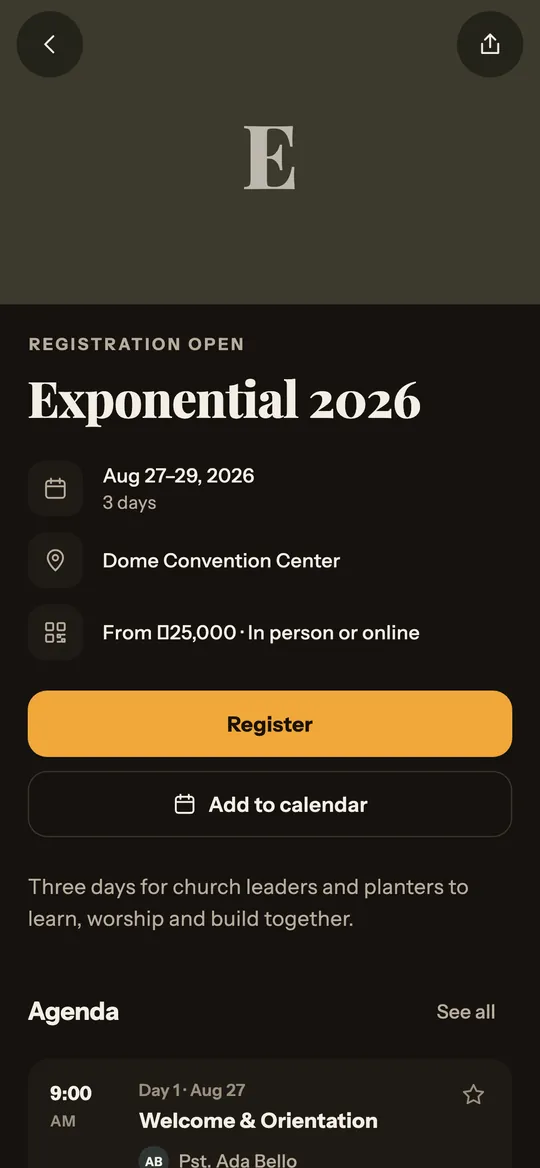
Event page with dates, venue, price and a Register button
  1. Announce the event. Its page shows dates, venue, prices and speakers.
  2. Register in a few taps, choosing in person or online.
  3. Pay in naira or dollars, or wait for approval if you review requests.
  4. Get a QR ticket, for one person or a whole group.
During

Arrive, follow and watch

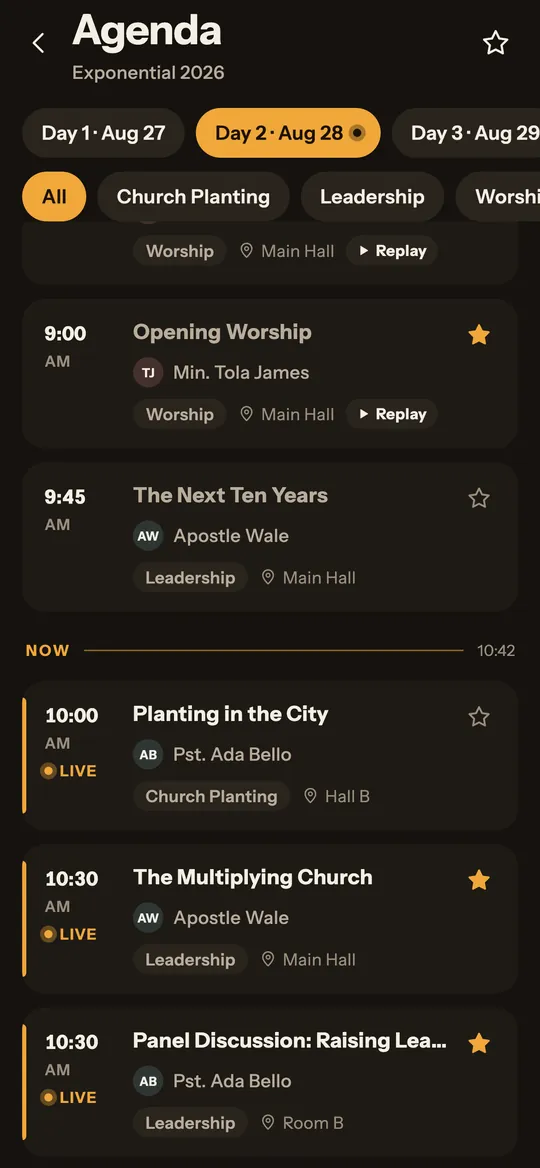
Agenda on the live day with a NOW line and live sessions marked
  1. Check in at the gate with one scan.
  2. Follow the agenda, with what's on now marked live.
  3. Build My Agenda by starring sessions, and get a reminder before each one.
  4. Watch Live inside the app from anywhere.
After

Relive and stay connected

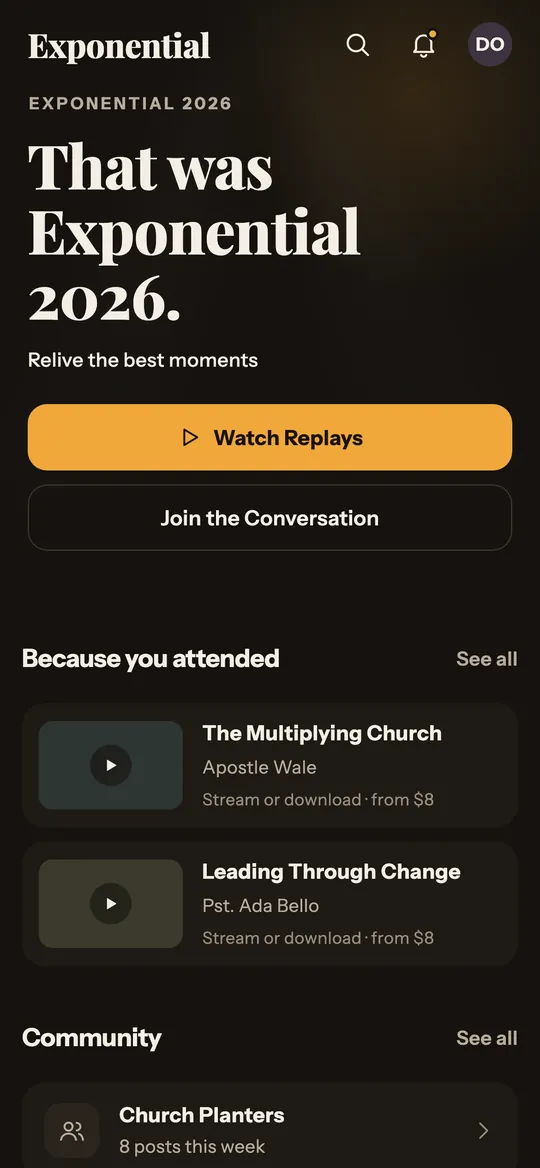
Home screen after the event with Watch Replays and community activity
  1. Watch replays for as long as you choose.
  2. Rate the sessions with stars and a comment.
  3. Keep talking in community spaces.
  4. Save the date: the app starts counting down to next year.
Features

What the app does, and what it means for you

Each feature below shows the screen, what it does, the benefit to your team and members, and an example of it in use. Screens show sample data.

Events & registration

Register and pay without leaving the app

Every event has its own page. Members choose how they'll attend, answer your questions, and pay. Answers they've given before fill in by themselves.

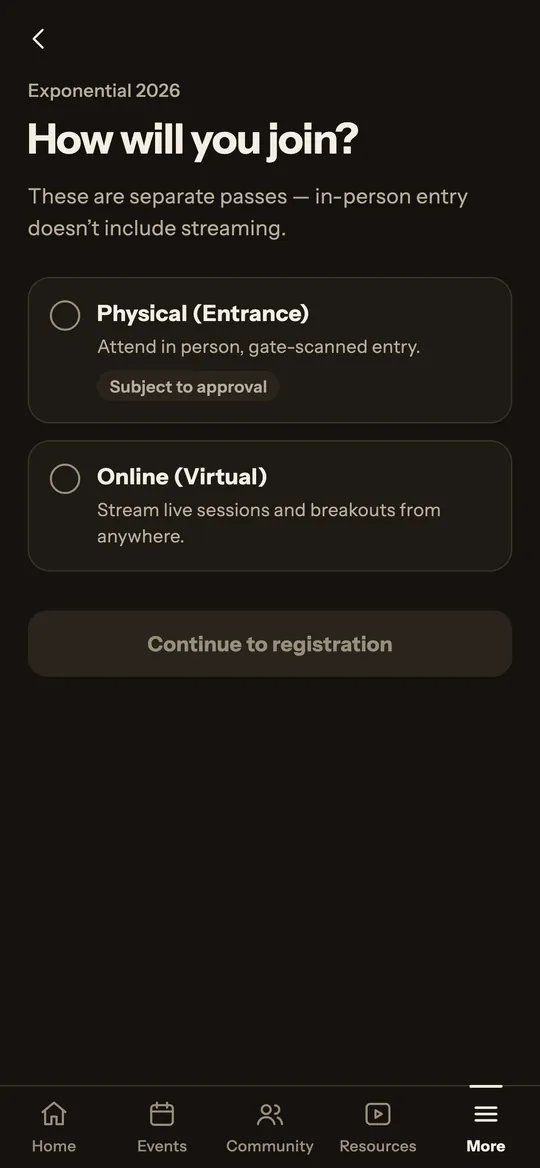
  • In-person and online passes, sold separately or together.
  • Group tickets for one person to register a team.
  • Early-bird prices, capacity limits, and opening and closing dates.
  • Approval when you want to review requests before payment.
  • Your own registration questions, set up in the back office.
  • Naira and dollars through Paystack, Flutterwave or Stripe.
For the church
No forms to merge or transfers to chase. Every registration and payment is in one list.
For members
Sign up in a minute, from their phone, at any time.

Example: a pastor registers his team of four, pays once, and each person gets a ticket.

Choosing between a physical and an online pass
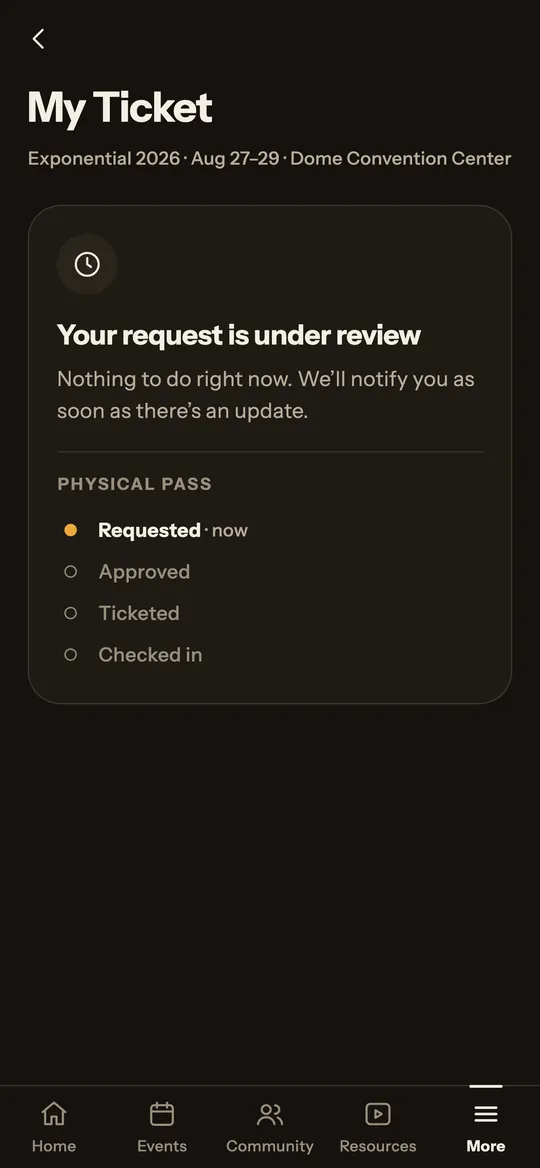
My Ticket showing a request under review
Tickets & check-in

A QR ticket in every pocket, and a quick gate

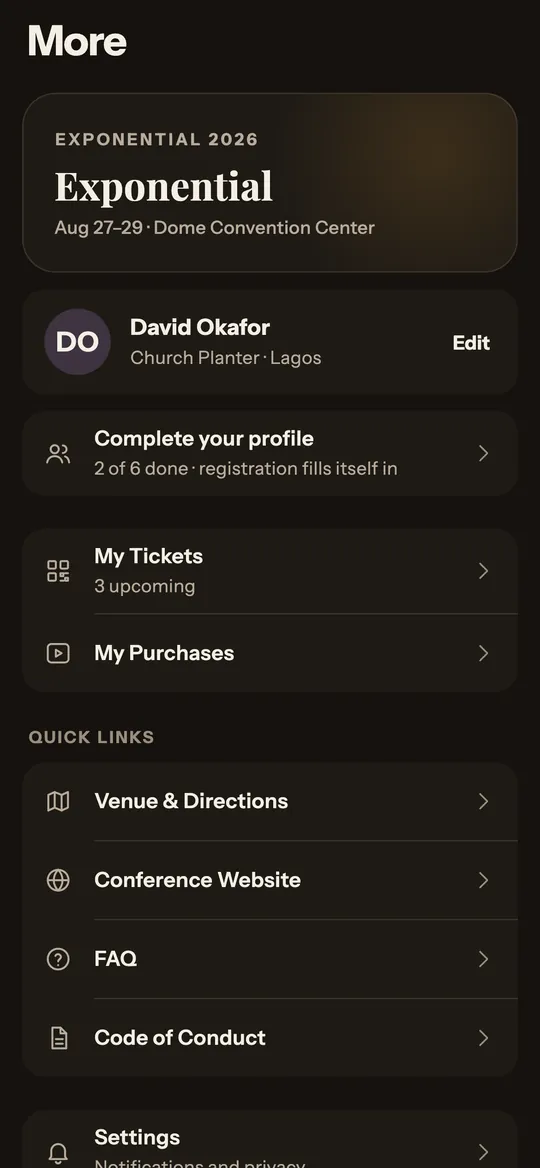
Once registered, the ticket is always in the app. At the venue, your volunteers scan it with any phone or laptop camera from the back office, or search a name.

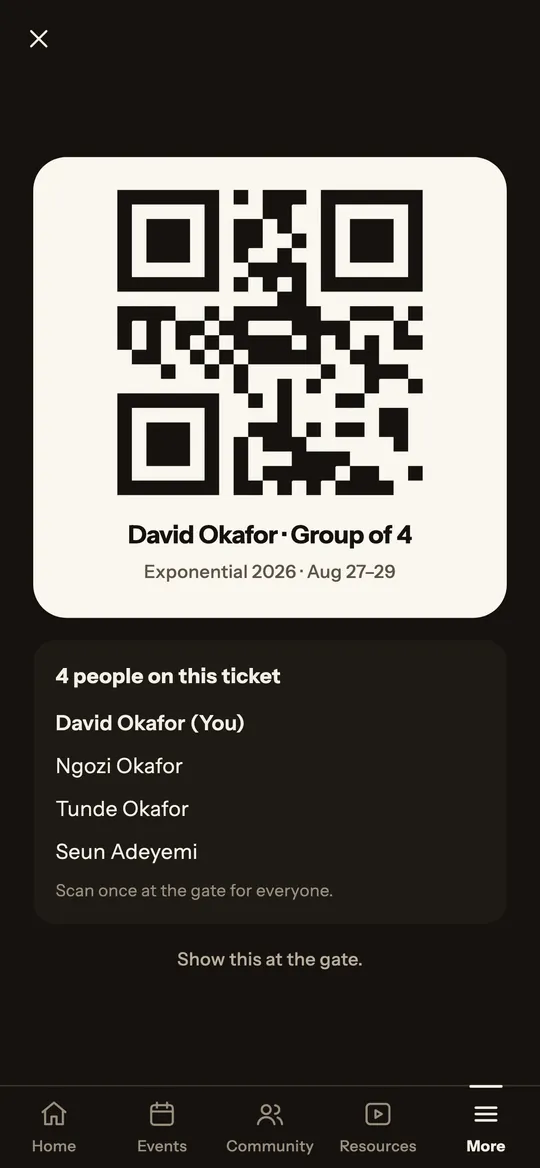
  • Personal and group QR codes; a group checks in with one scan.
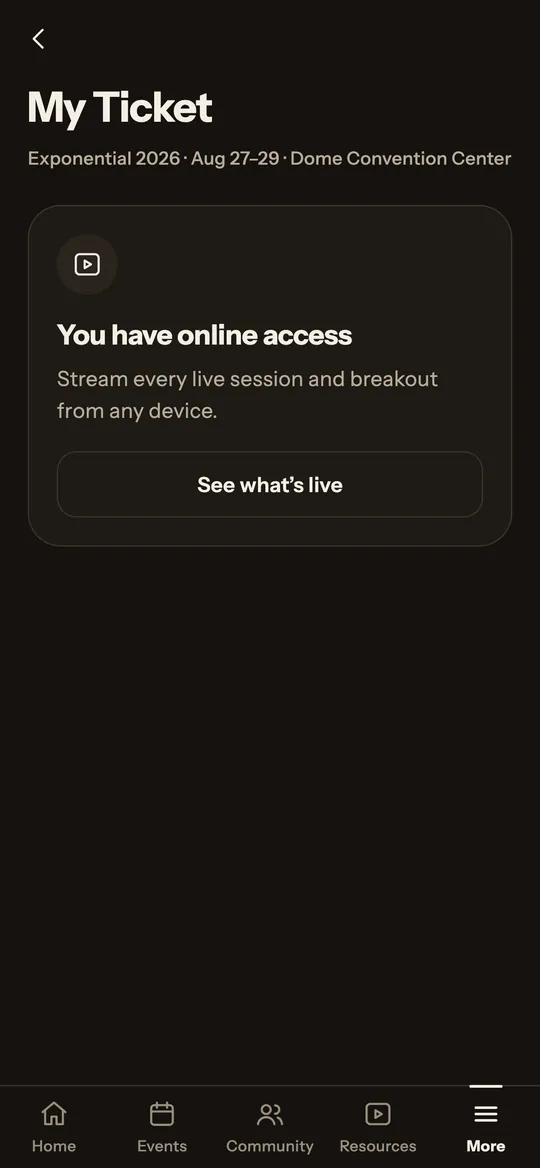
  • Online access passes for people joining remotely.
  • Live check-in count as people arrive.
  • Clear status: under review, payment due, ticketed, checked in.
For the church
Shorter queues, fewer volunteers, and accurate attendance.
For members
No printing, no lost emails. The ticket is in the app.

Example: at 7:30 AM the gate team opens Check-in on two phones and scans 1,200 people in by the opening session.

Group QR ticket for four people
Online access ticket
Agenda & speakers

The full programme, always up to date

Days, sessions, halls and speakers, filtered by track. On the day, a line shows what's on now. Change a room in the back office and every phone updates.

  • My Agenda: members star sessions and get a reminder before each.
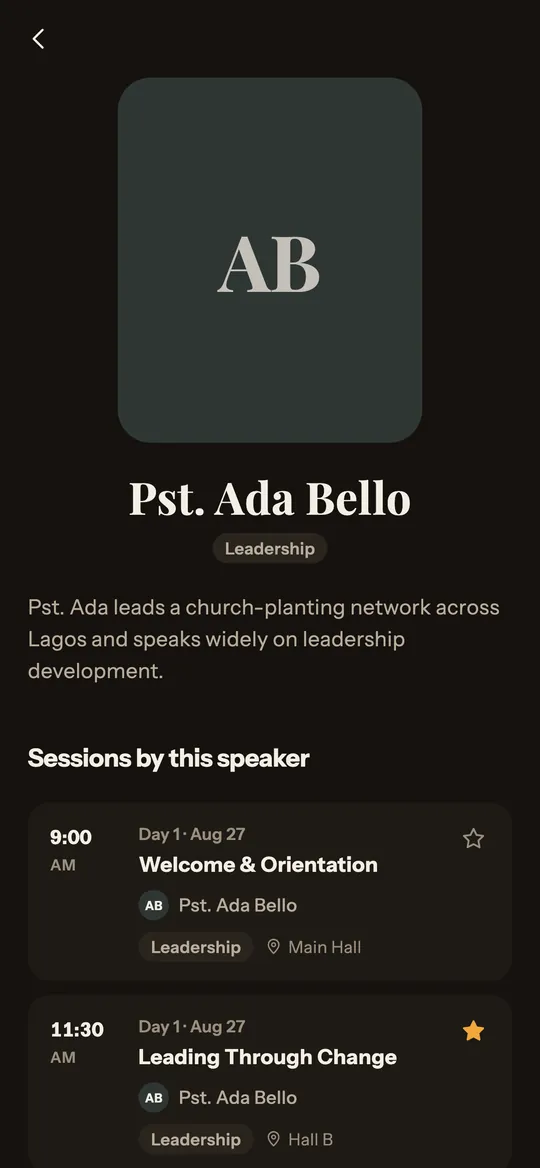
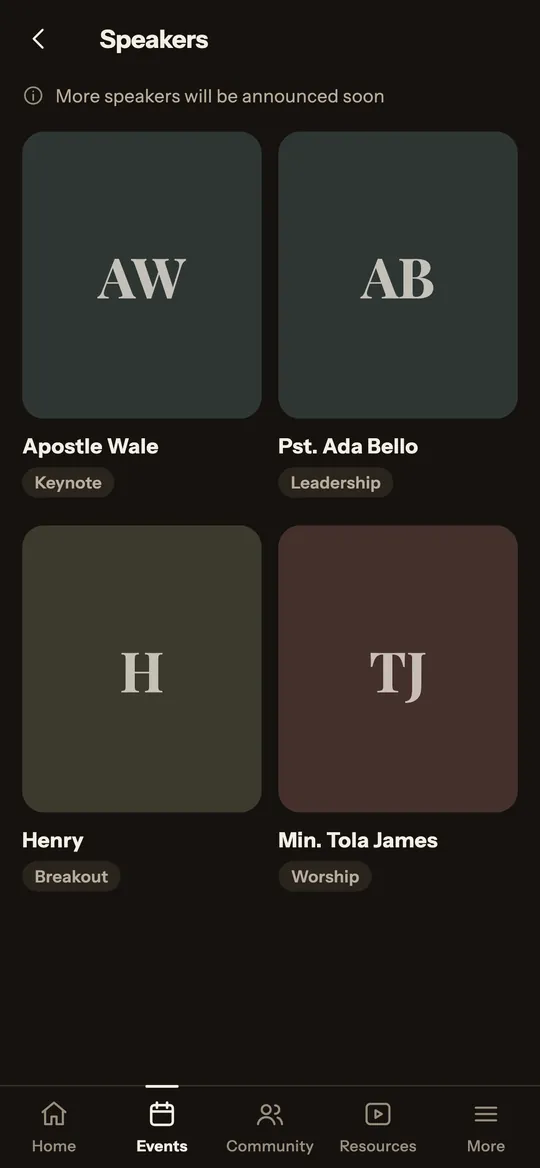
  • Speaker profiles with photo, bio and their sessions.
  • Session pages with details and a discussion for questions.
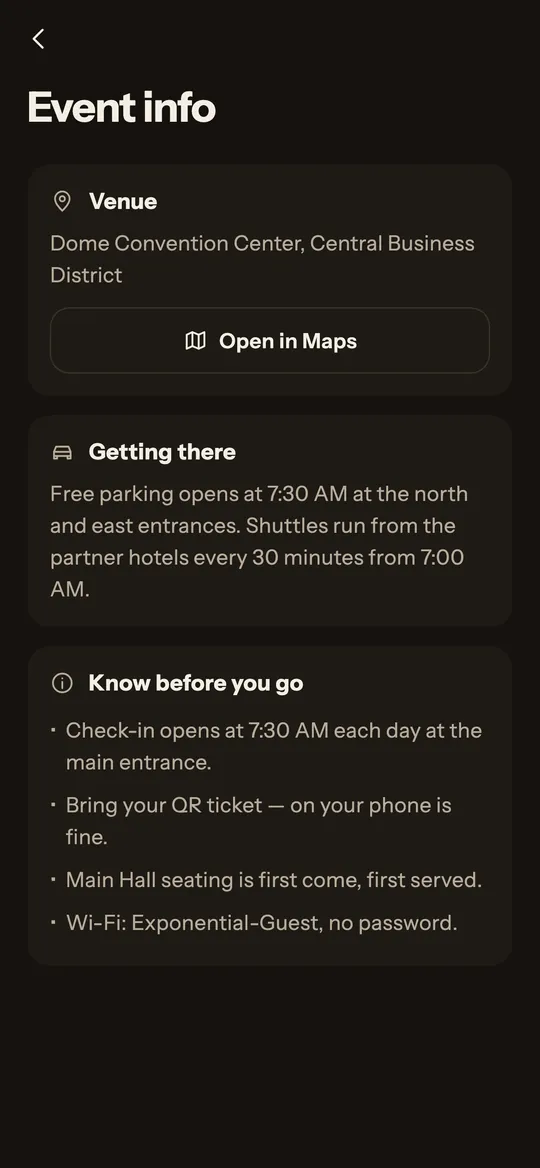
  • Venue and info: maps, directions, Wi-Fi and what to bring.
For the church
Change plans in one place. No reprinting programmes.
For members
Always know where to be next.

Example: the panel moves from Hall B to the Main Auditorium. You change it once, every phone shows the new room, and a push notice tells in-person attendees.

Speaker profile with bio and sessions
Event info with venue, directions and know-before-you-go
Livestream & replays

Watch live inside the app, then catch up later

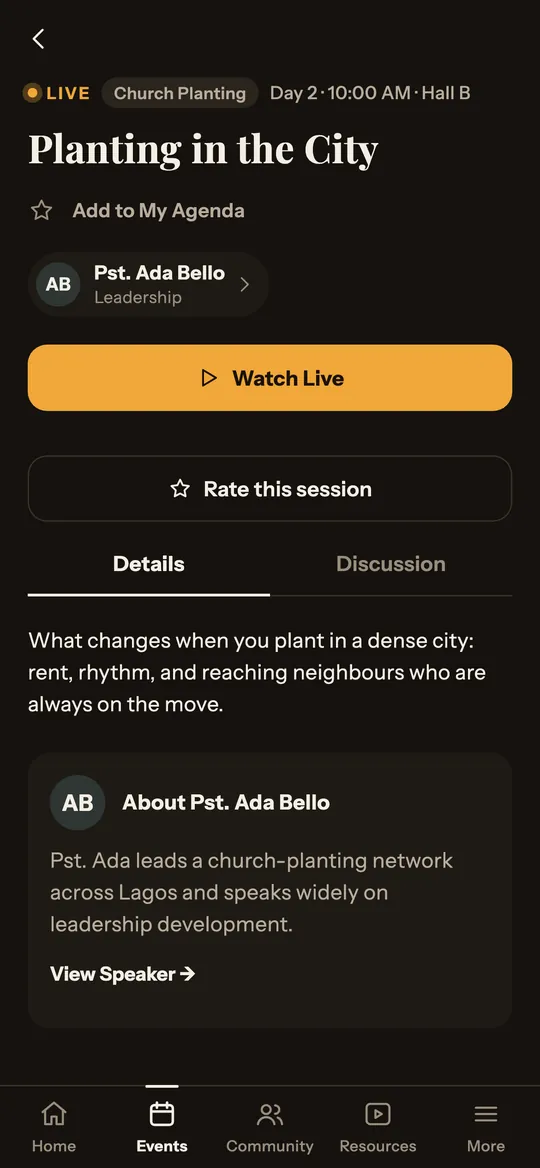
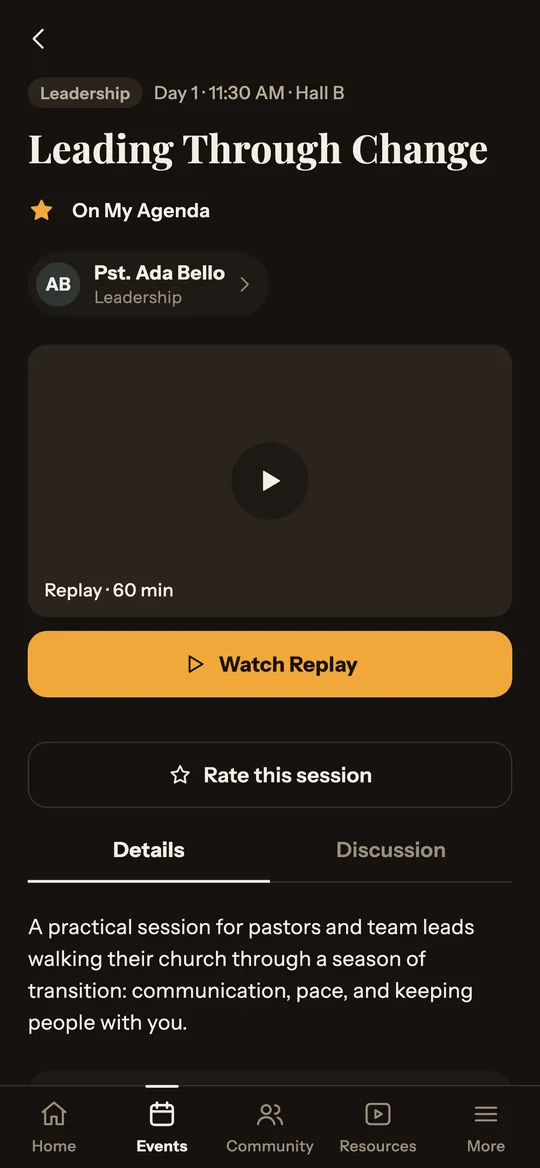
When a session goes live, the Home screen and agenda show a Watch Live button. YouTube, Vimeo and streaming links play inside the app. After the event, add a replay link and choose how long it stays up and who may watch.

  • Live and replay in one player that stays inside your app.
  • Zoom sessions: watch in the app, and tap "Join on Zoom to speak" only if you need to talk.
  • Replays per session or for the whole event, available for 7, 30 or 90 days, until a date, or always.
  • Who can watch: everyone registered, online pass holders only, or anyone.
  • No video hosting needed: use your unlisted YouTube or Vimeo links.
For the church
Reach people who couldn't travel, and give online passes real value.
For members
One tap to watch. No hunting for links in chats.

Example: the keynote streams to YouTube. Online pass holders watch it in the app, and the replay stays up for 30 days.

A session that is live now with a Watch Live button
Session replay ready with a Watch Replay and Rate this session button
Community

Spaces that keep people together after the event

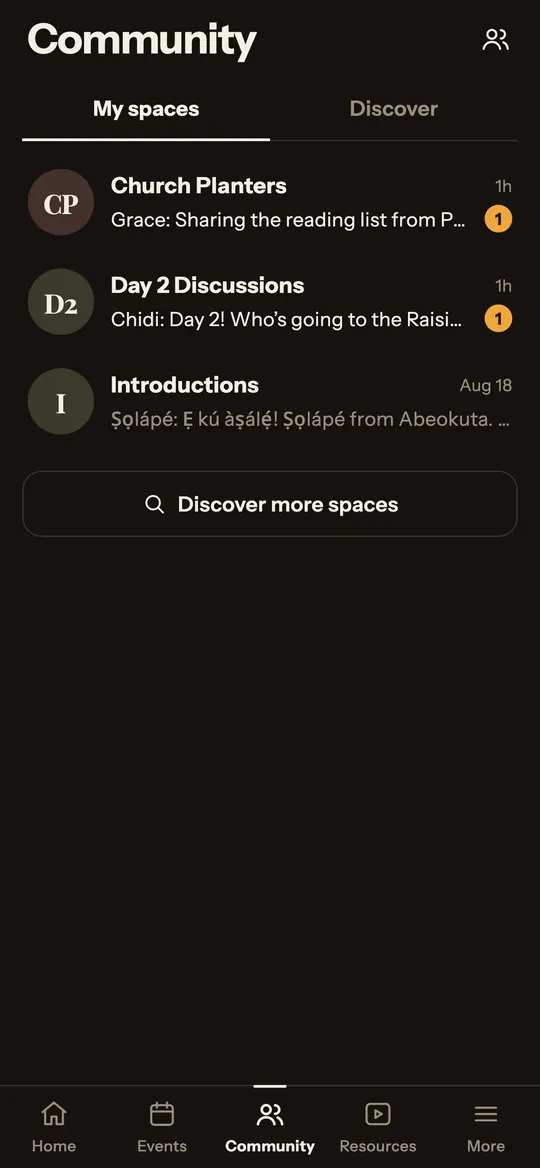
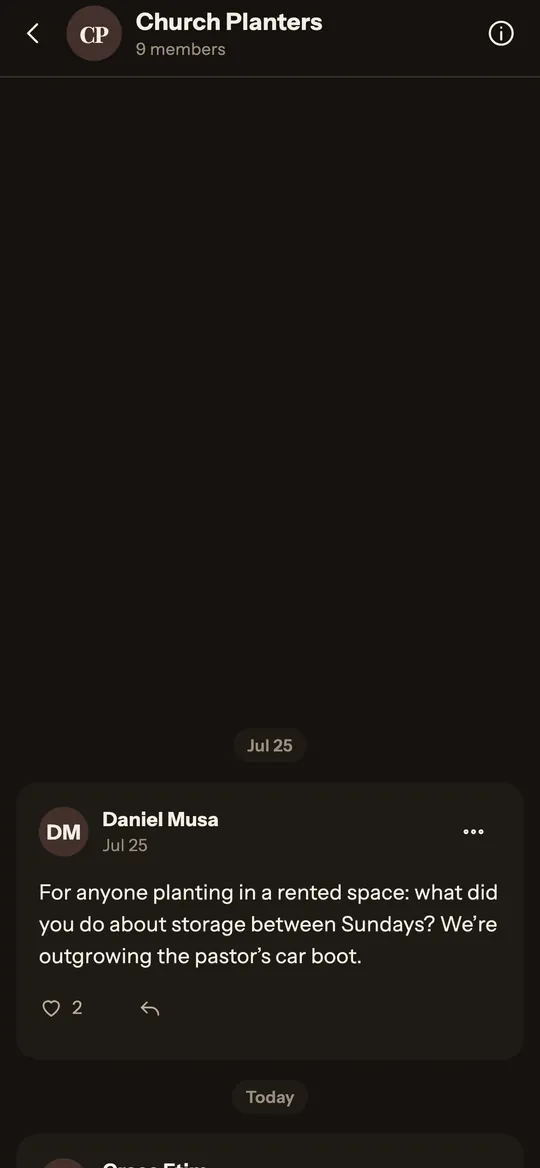
Community spaces are groups inside the app: for church planters, worship leaders, a cohort or a city. Members post, reply and share materials. Your team decides who can join and keeps things safe.

  • Open, request-to-join or paid spaces.
  • Materials: documents, links, photos and videos, shared by admins.
  • Attendee directory, which members can choose to leave.
  • Direct messages with mute, block and report.
  • Moderation in the back office for reports and removals.
For the church
Turn a three-day event into a year-round network.
For members
Stay in touch with the people they met, in a safe place.

Example: after the planting track, the speaker shares a readiness checklist in the Church Planters space and answers questions all month.

Community tab listing the member's spaces
A community space with posts and replies
Announcements & notifications

Reach the right people at the right time

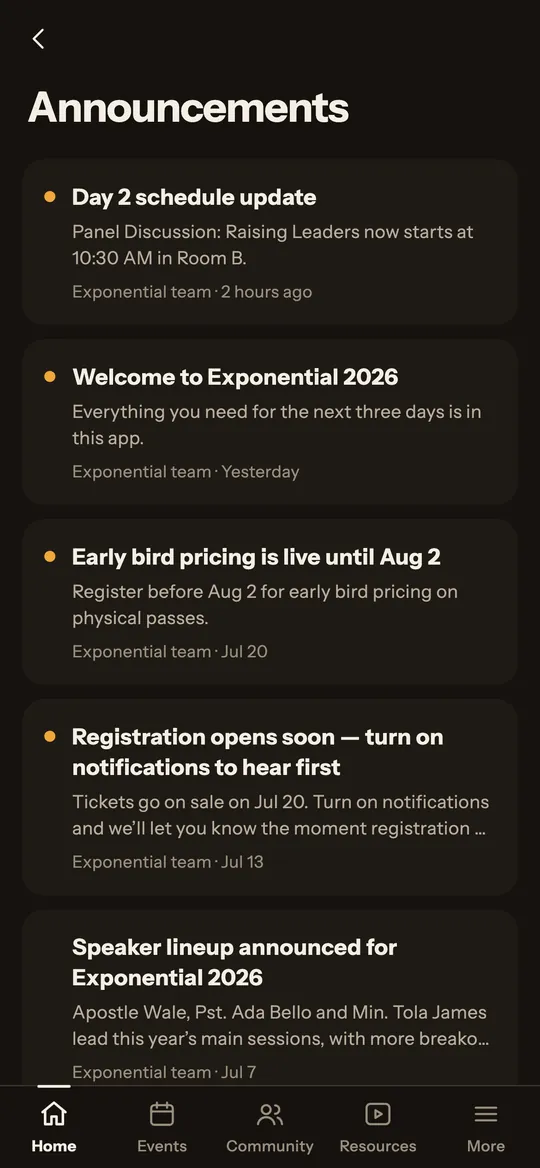
Post an announcement and choose who gets it: everyone, attendees of one event, one type of pass, or members of a space. Send it as a push notification now or schedule it.

  • Targeted announcements with a preview of how they'll look.
  • Push notifications, sent now or scheduled.
  • Automatic reminders before starred sessions.
  • Birthday wishes sent on members' birthdays, if you turn it on.
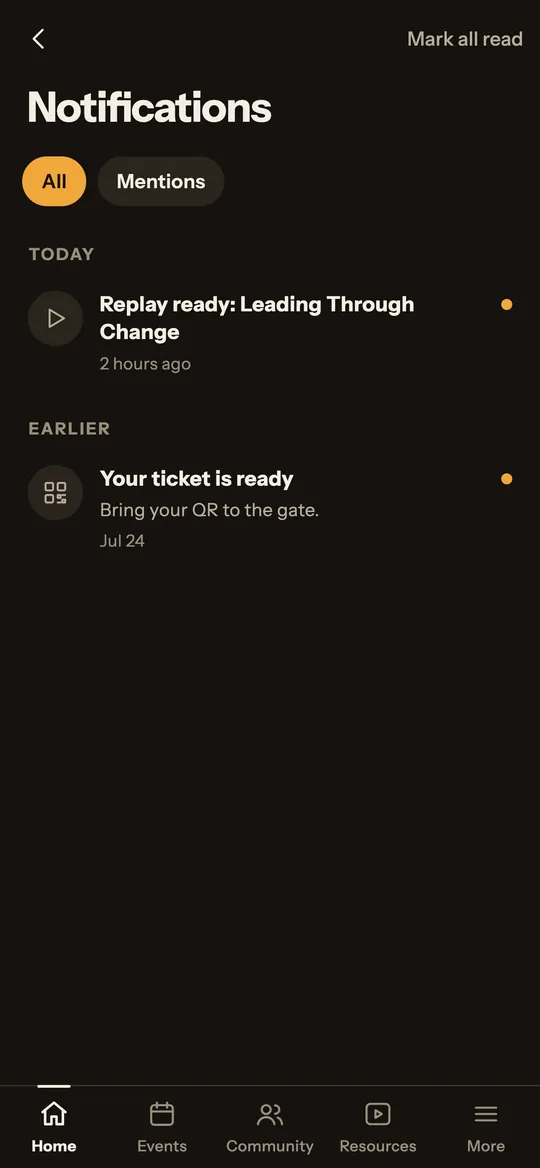
  • An inbox in the app, so a missed notification is never lost.
For the church
One message reaches everyone, with no WhatsApp groups to manage.
For members
Only the updates that concern them.

Example: "Lunch moved to Hall B", sent at 11:50 only to in-person attendees of Day 2.

Announcements list
Notifications inbox
Members & feedback

Know your people, and hear from them

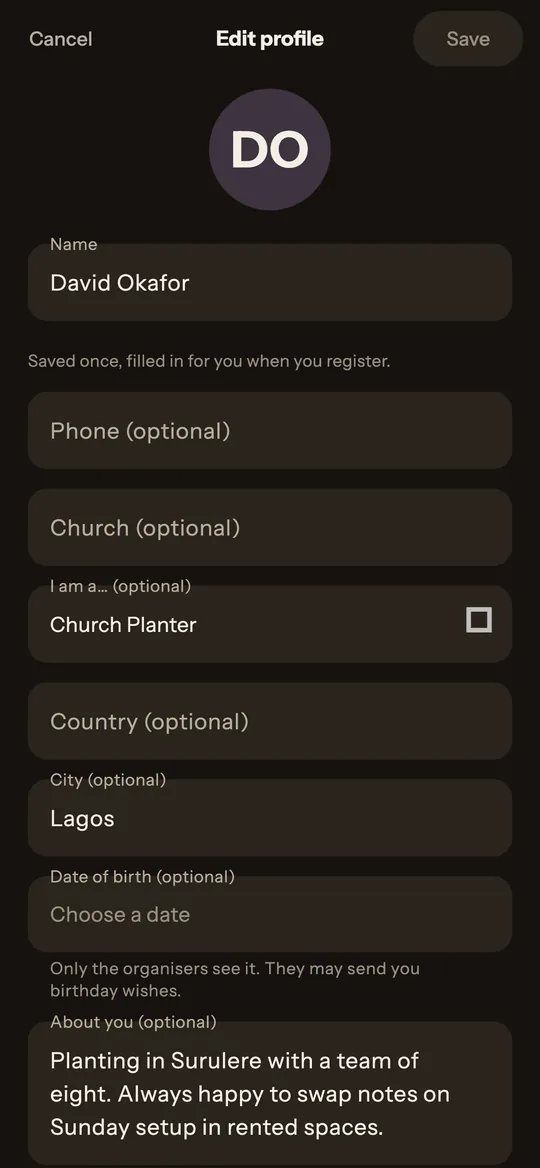
Members keep one profile. You decide what it asks for, such as phone, church, role, country and date of birth. Registration forms fill themselves from it, and after each event or session members can leave feedback.

  • A profile form you design, with a gentle prompt to complete it.
  • Feedback: stars and a comment, once per session, named or anonymous.
  • People list in the back office, with search and export.
  • In-app pages and live chat: your website, giving page or help chat open inside the app with your branding.
  • Search across sessions, speakers and spaces.
For the church
Better data on who comes, and honest feedback to plan next year.
For members
Type their details once, and be heard.

Example: 400 ratings for Day 1 arrive by evening, with comments, ready for the planning meeting.

Edit profile form
More tab with tickets, quick links and settings
Resources

A library of past sessions

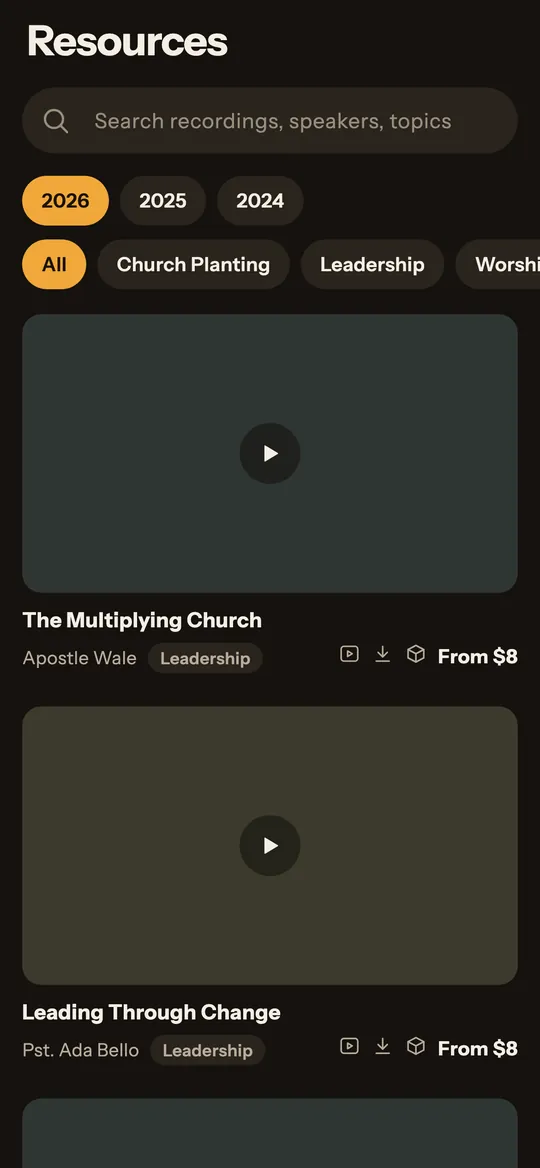
Recordings from this year and earlier years, searchable by speaker and topic. Your teaching keeps working for you long after the event.

  • Organised by year and track.
  • Search by title, speaker or topic.
  • Session pages link to their recording.
For the church
Content that lasts beyond the conference weekend.
For members
Return to a message whenever they need it.
Resources library of recordings
Speakers grid
The back office

Where your team runs it all

A website your staff sign in to from any computer. No technical skills needed. Each person gets only the access their role needs.

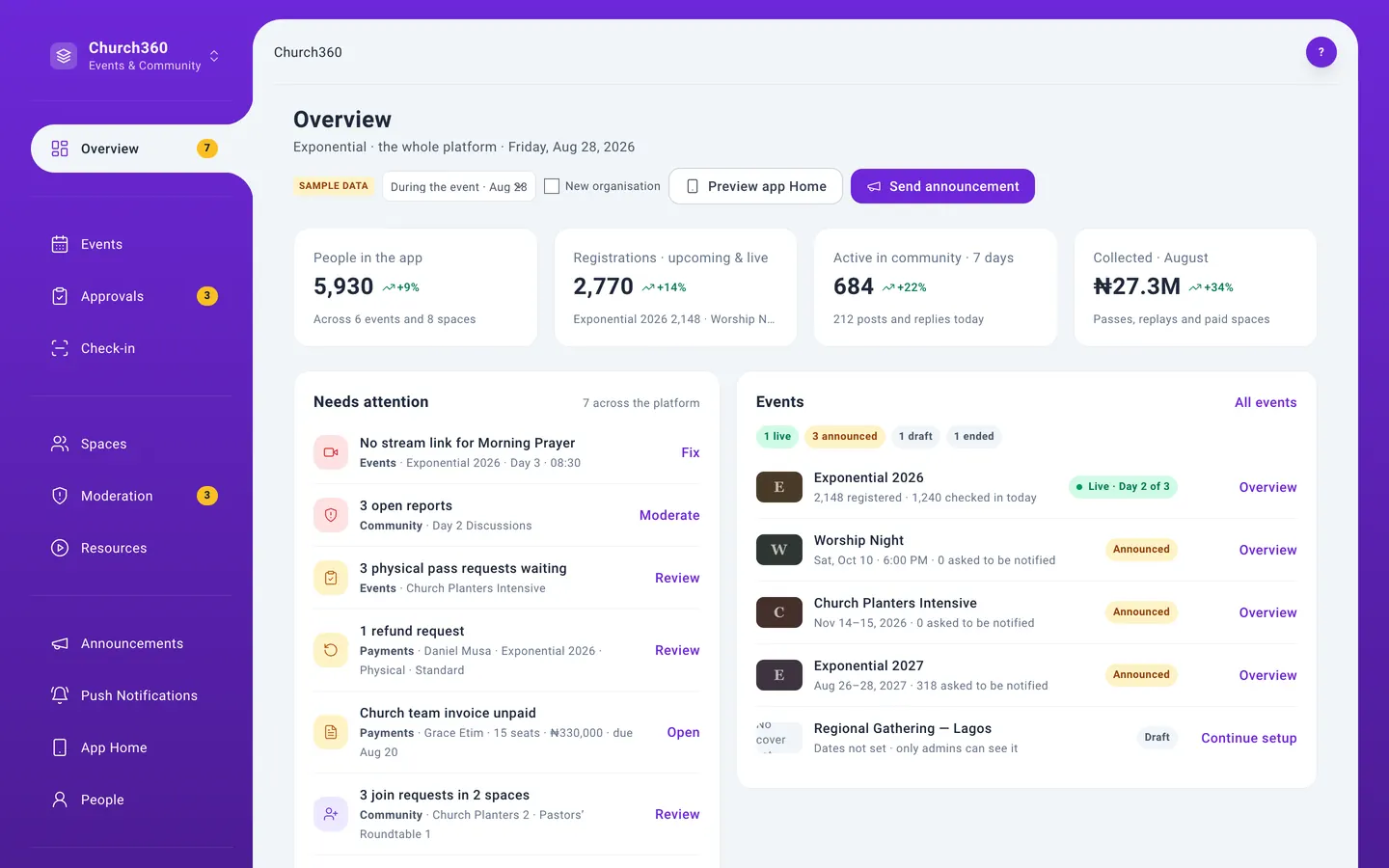
Back office overview with registrations, revenue and items needing attention
OverviewToday's numbers and anything waiting on your team, such as approvals, reports and refunds.
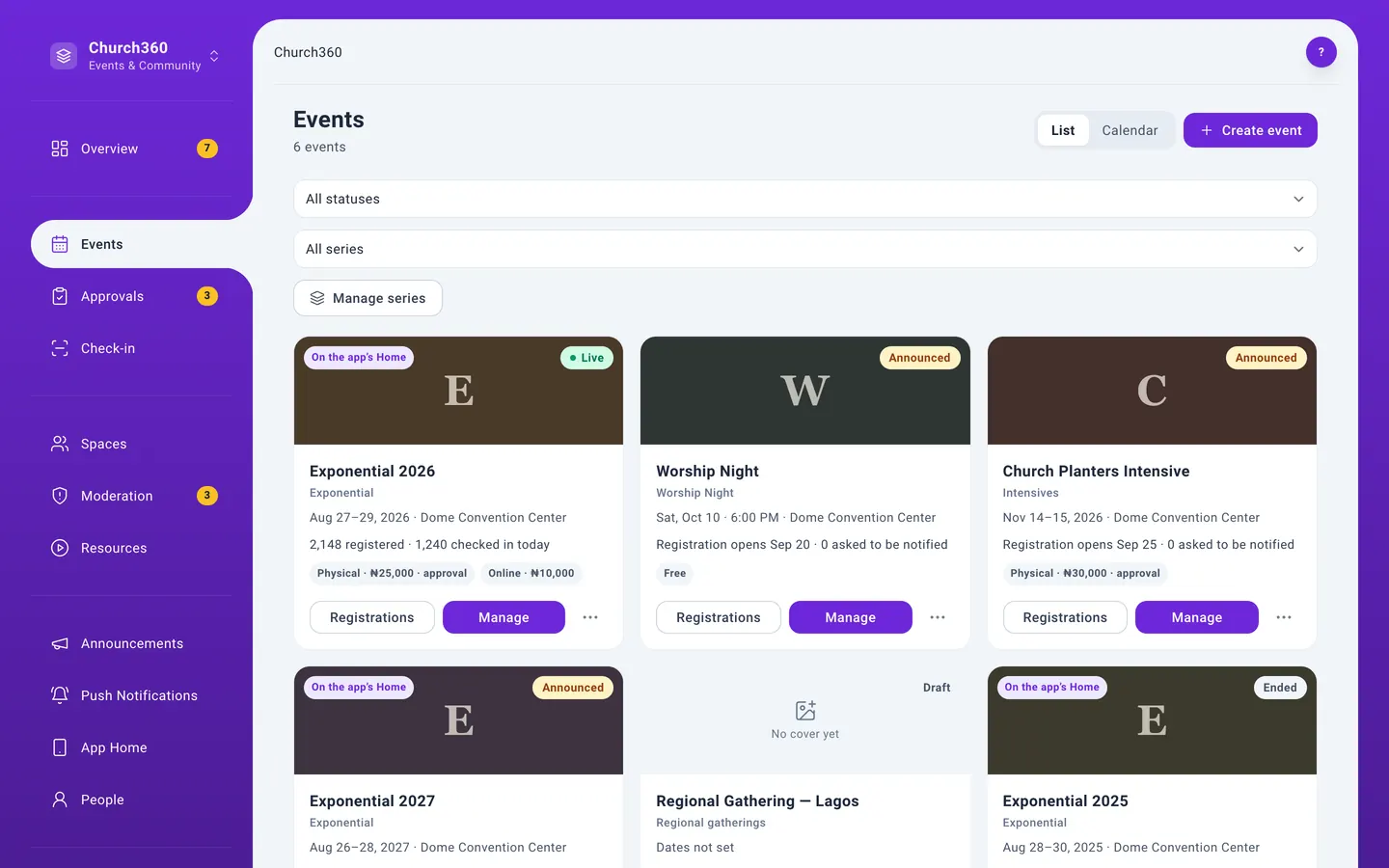
Events list with cards for each event
EventsEvery event in one place, with its own series, cover image, status and registrations.
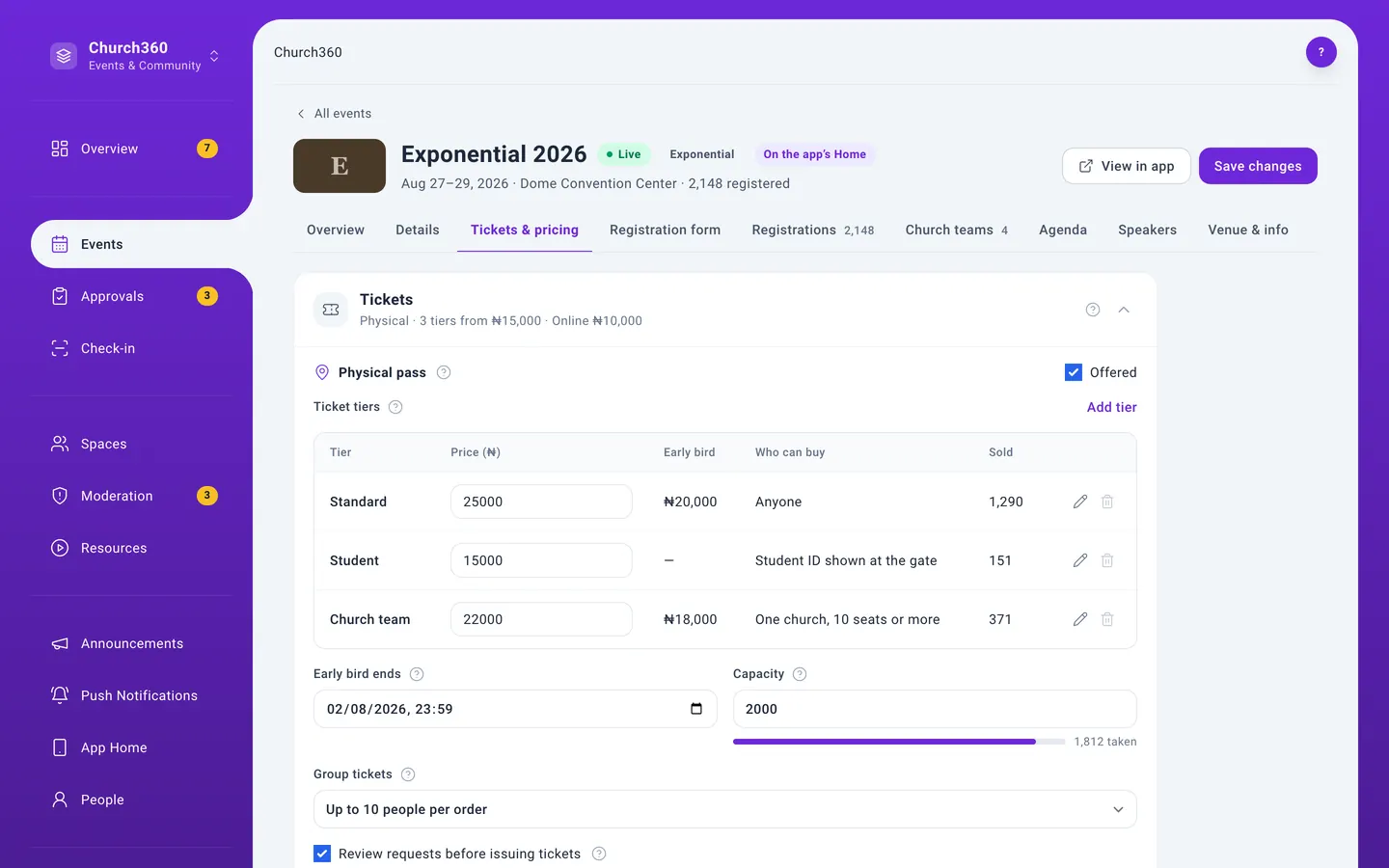
Tickets and pricing settings
Tickets & pricingPasses, tiers, early-bird prices, capacity, group sizes and currencies.
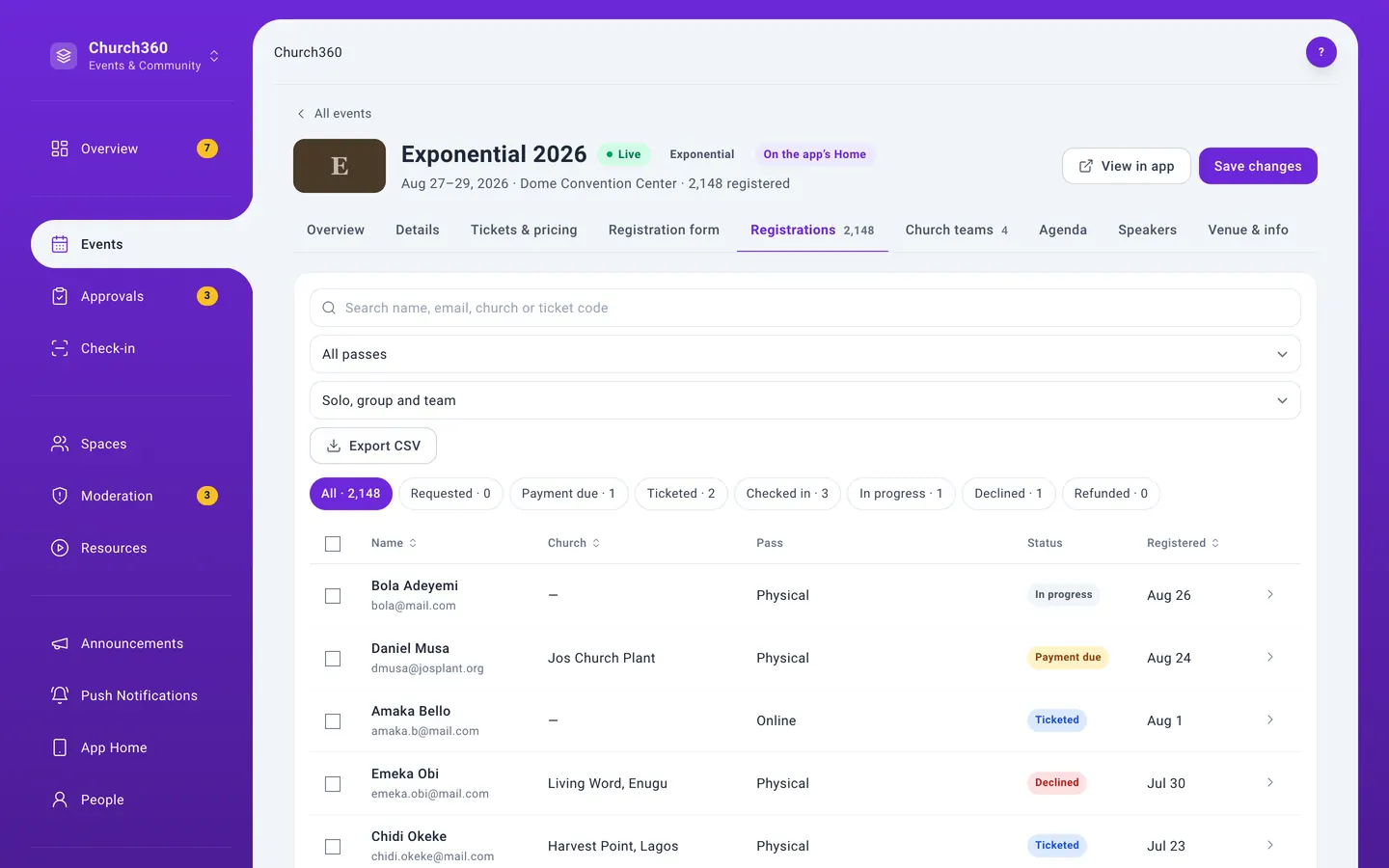
Registrations list with statuses
RegistrationsEveryone who signed up, with status, payment and church. Export to a spreadsheet.
Agenda editor by day
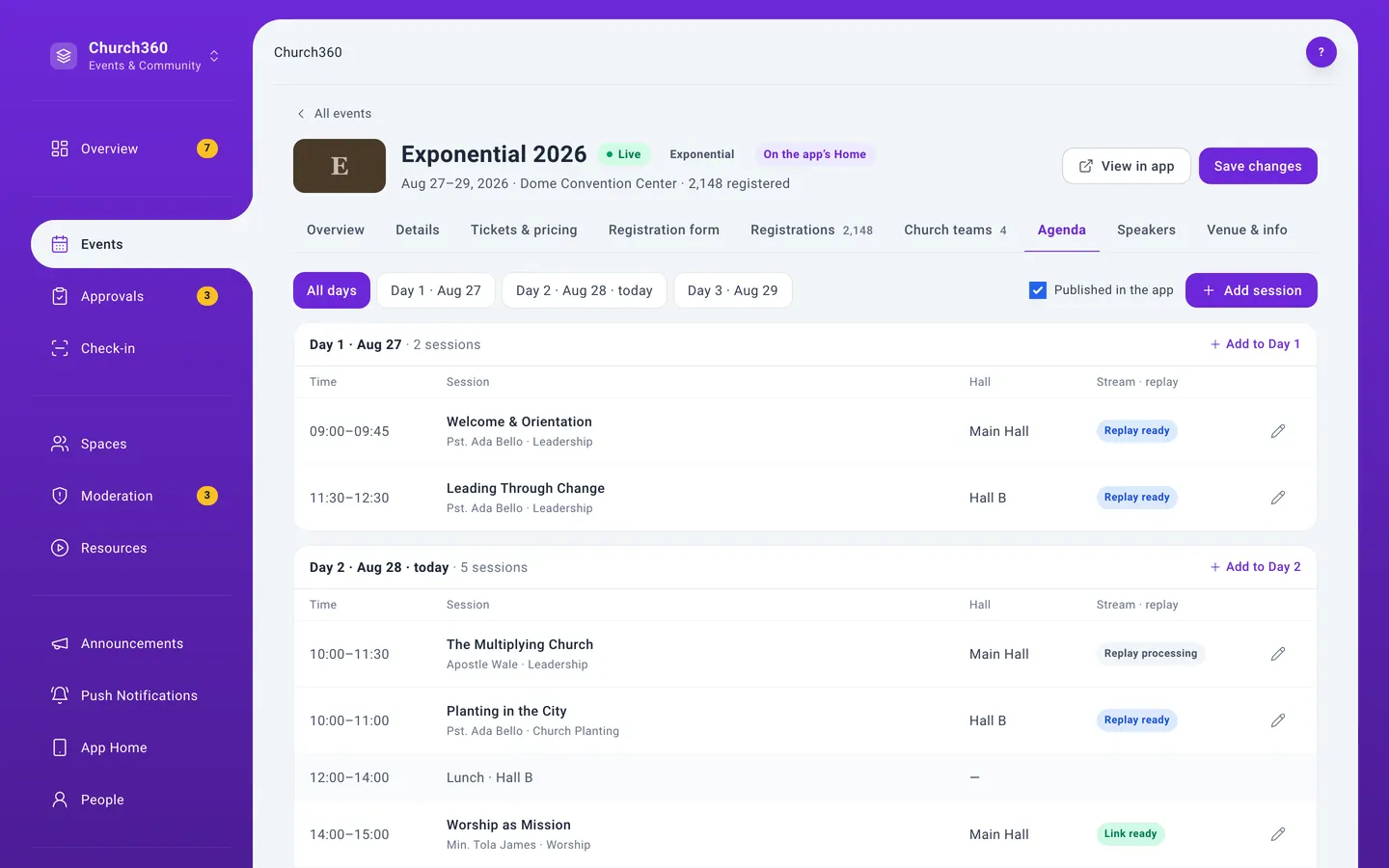
AgendaBuild each day's sessions with halls, tracks, speakers, live links and replays.
Check-in scanner with live count
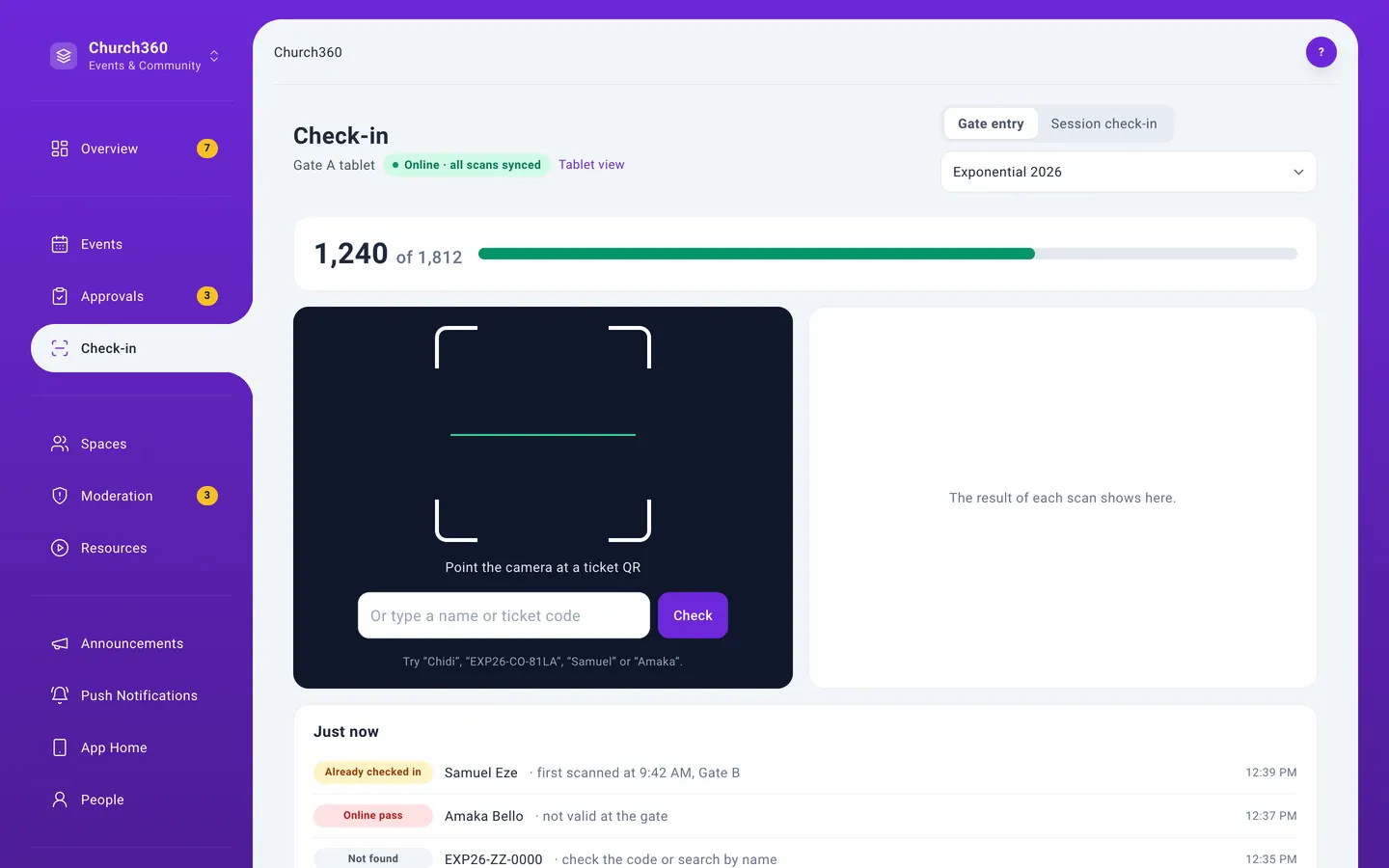
Check-inScan QR tickets with the camera or search a name, and watch the count rise.
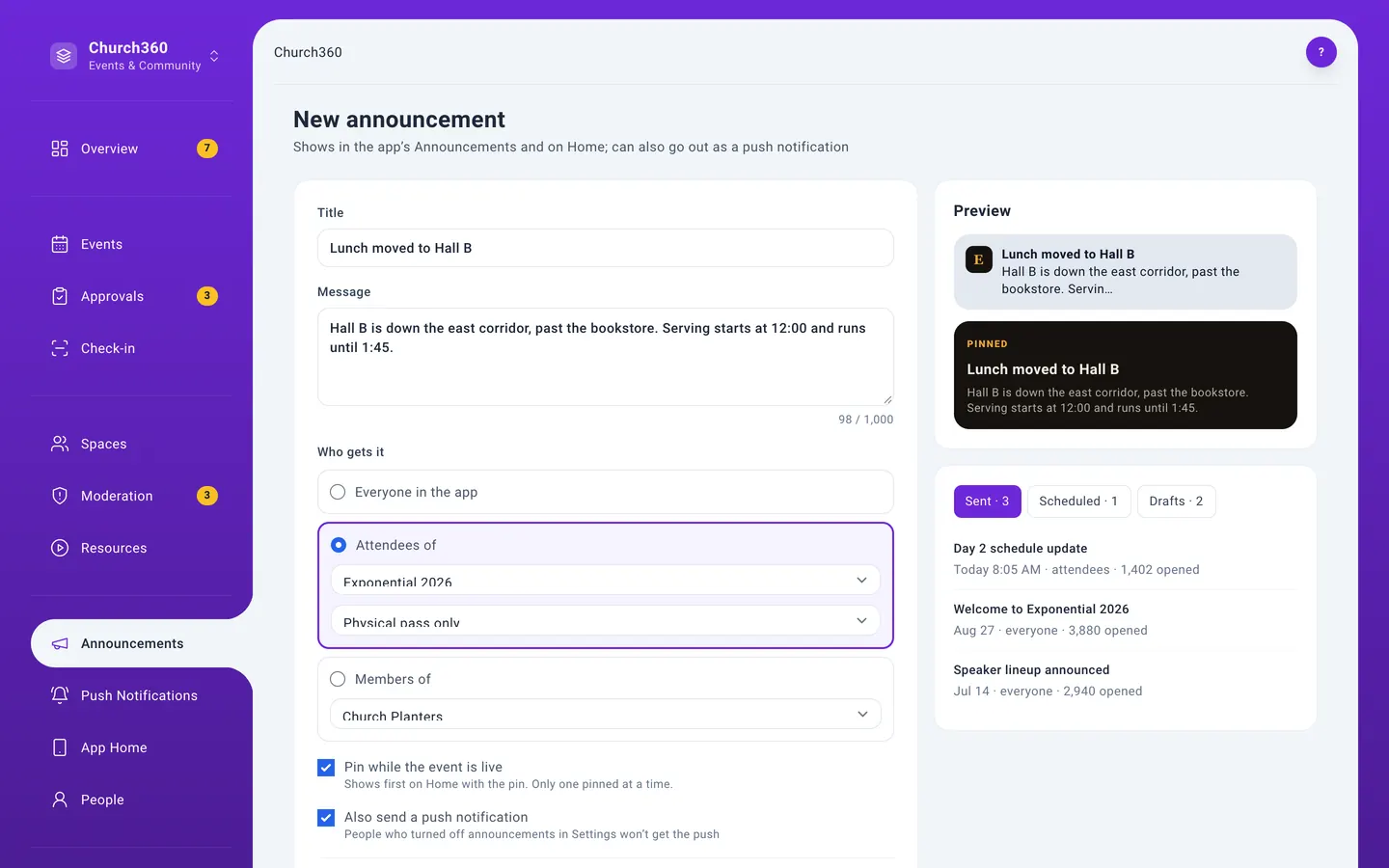
Writing a new announcement with audience choice and preview
AnnouncementsWrite once, pick the audience, preview it, and send it as a push notification.
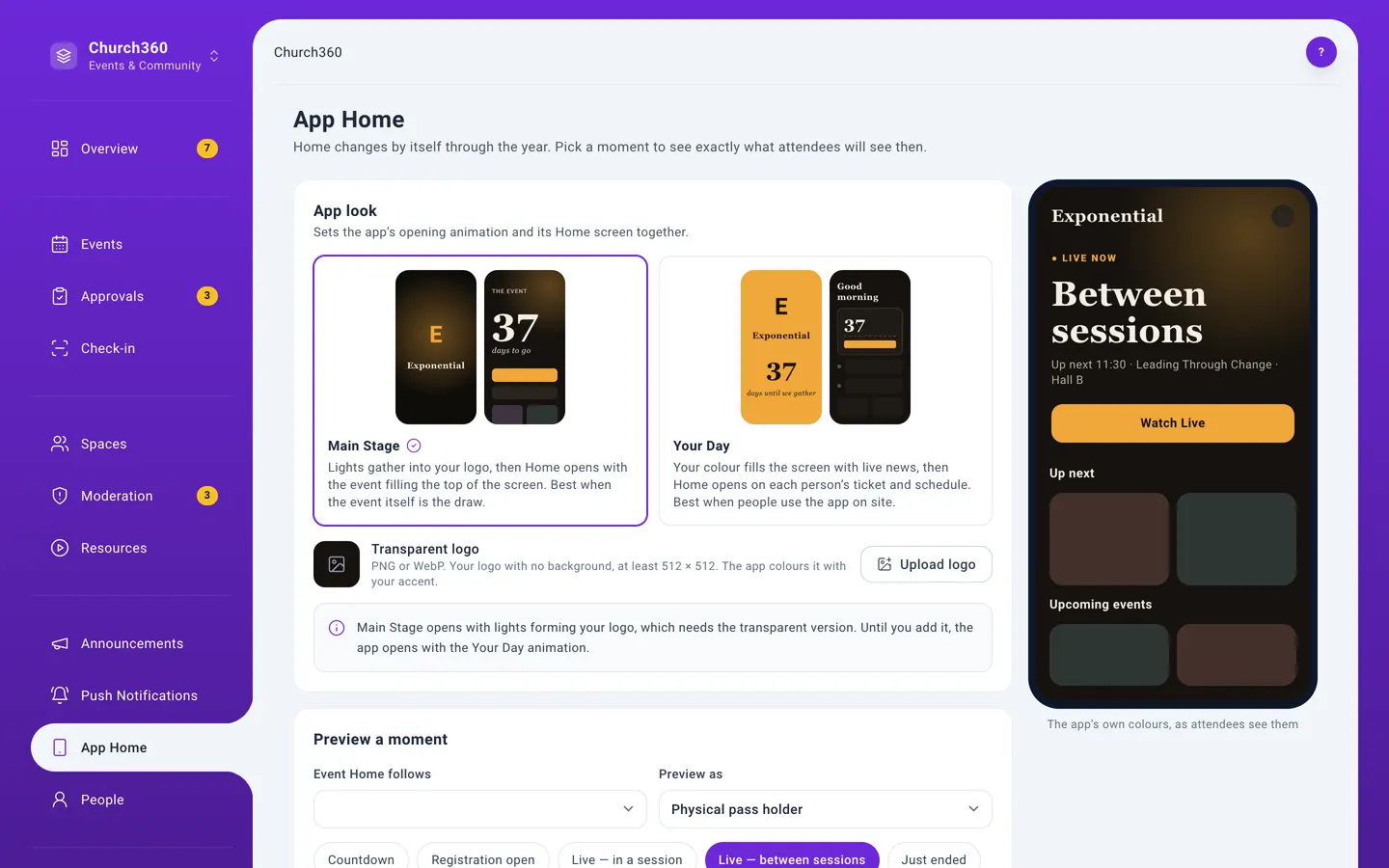
App Home settings with a live phone preview
App HomeChoose the app's look and preview the Home screen at every stage of an event.
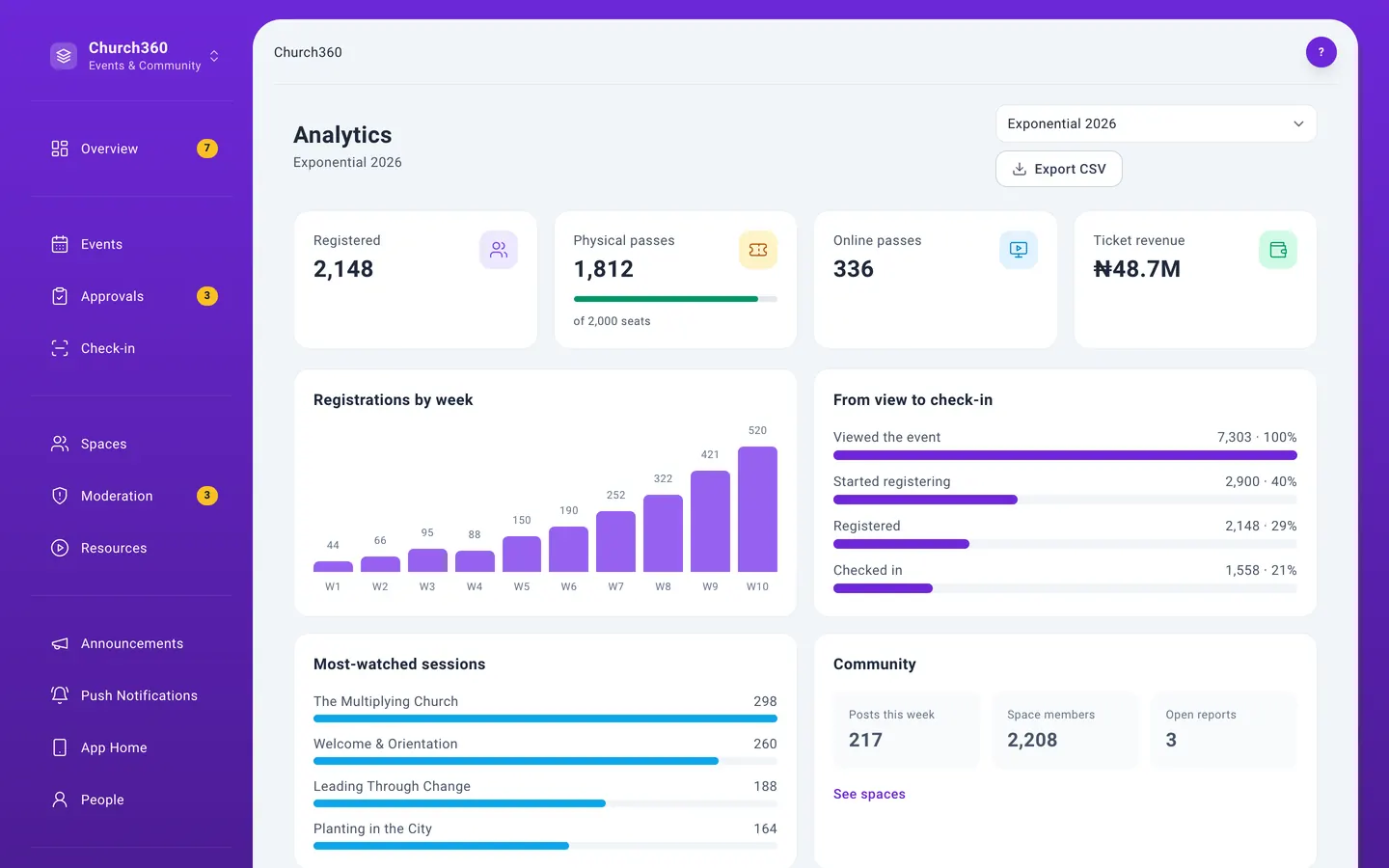
Analytics with registrations by week and most-watched sessions
AnalyticsRegistrations by week, from view to check-in, most-watched sessions and community activity.
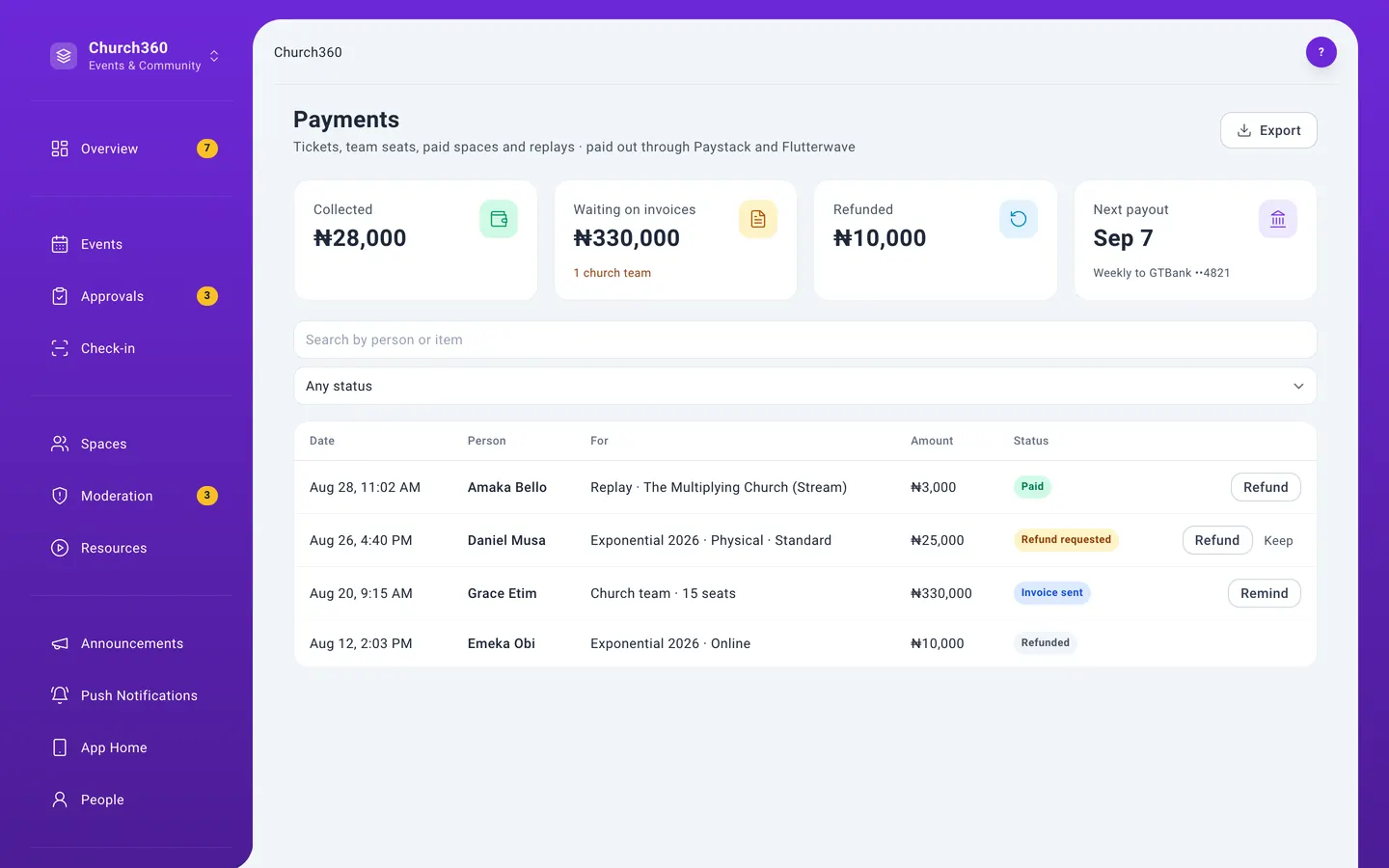
Payments list with refunds and payouts
PaymentsEvery payment, refund and payout, by event and currency.
Benefits

What each group gains

Leadership

A clear view and a stronger brand

  • Your own app, under your name, in both stores.
  • Attendance, revenue and engagement in one dashboard.
  • A year-round relationship with your network.
Events team

Less admin, fewer surprises

  • Registrations, payments and tickets in one list.
  • Change the agenda once and everyone sees it.
  • Fast check-in with phones at the gate.
Finance

Money you can trace

  • Payments go straight into your own gateway account.
  • Every ticket shows paid, due or refunded.
  • Naira and dollar prices, set by you.
Members

Everything in one place

  • Register, pay and carry their ticket in the app.
  • Watch live and catch replays without hunting for links.
  • Stay connected with the people they meet.
Your brand

It's the Exponential app, not ours

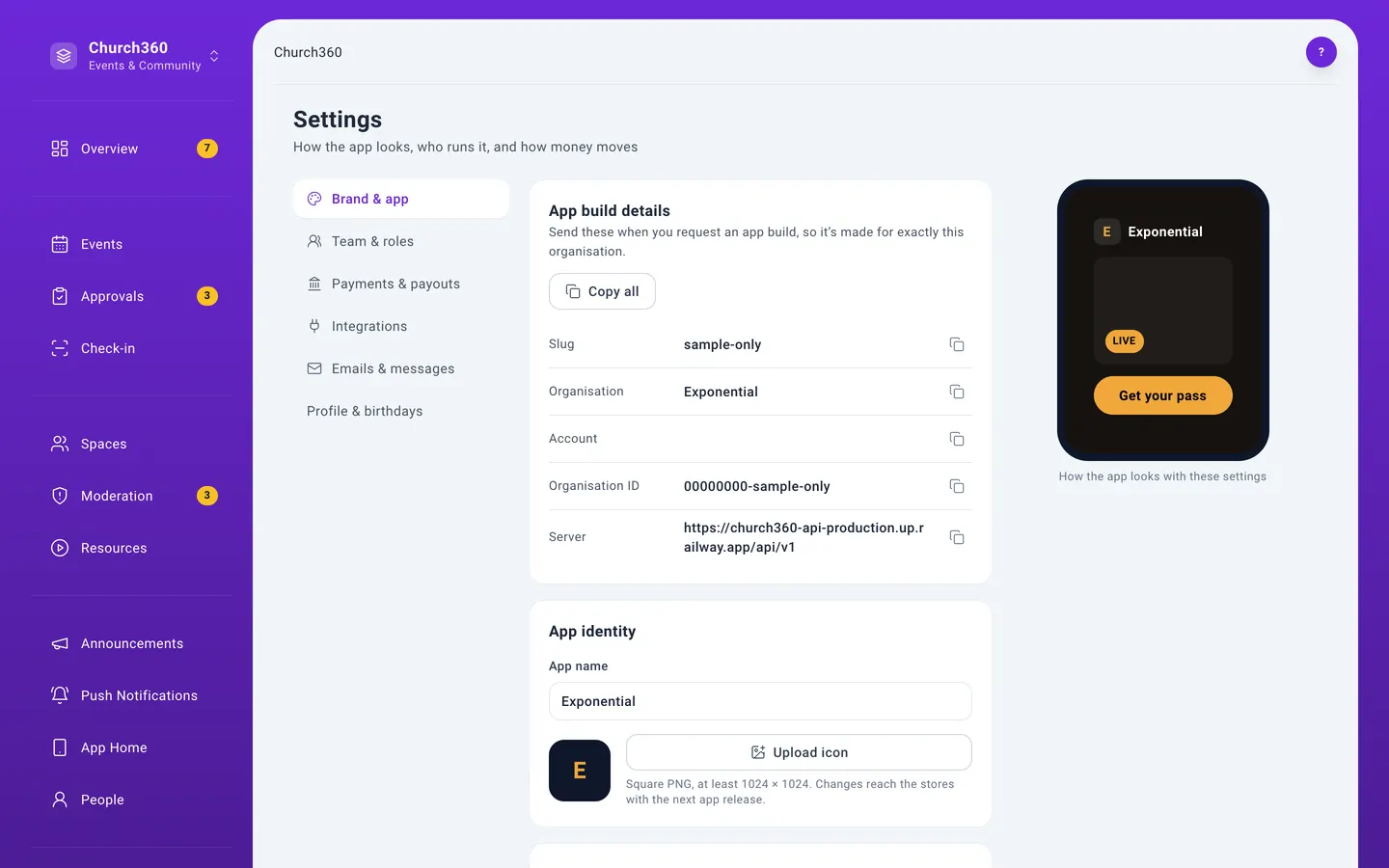
Members download an app called Exponential, with your logo, your colours and your words. Church 360 works quietly underneath.

  • App name and icon on members' phones.
  • Opening splash screen in your design.
  • Colours and Home look chosen in the back office.
  • Store listings with your name, description and screenshots.
  • Your words in every announcement and page.
  • Your quick links to your website, giving page and help chat.

The only mention of us is a small "built on Church 360" line in the app's More tab.

Brand settings with app name, logo and live preview
Security & privacy

Your members' data, handled with care

You own the data

Your members, registrations and payments belong to Exponential. Export them to a spreadsheet at any time.

Card details stay with the bank

Payments are taken on Paystack's, Flutterwave's or Stripe's secure pages. Card numbers never reach our servers.

Access by role

Each staff member sees only what their role allows. Members' contact details are visible only to your team.

Members stay in control

They choose whether to appear in the directory and who can message them, can block and report, and can delete their account in the app.

Getting started

From yes to launch in about four weeks

A typical timeline. Apple and Google set their own review times, usually a few days.

Week 1

Kick-off and branding

We agree the plan, collect your logo, colours and app name, and set up your back office and team accounts.

Week 2

Your content

Together we add your first event, prices, agenda, speakers and quick links, and connect your payment account.

Week 3

App store publishing

We build your branded app and submit it to the App Store and Google Play. Your team tests it first.

Week 4

Training and launch

We train your team, then you announce the app to your network. We stay close through your first event.

Who does what

We run the technology. You run the ministry.

TaskWhoWhat it involves
Hosting, backups and securityVue EzyServers, data backups, security patches and monitoring.
App updates and store publishingVue EzyNew versions of your app for new phones and new features, submitted to Apple and Google for you.
Fixing problemsVue EzyAnything not working as it should is ours to fix, at no extra cost.
Technical supportVue EzyHelp for your team by email, with priority during your events.
Events, agenda, speakers and announcementsYour teamYour content, added and updated in the back office. We help you set up the first event.
Approvals, check-in and moderationYour teamDeciding on requests, scanning tickets and looking after your community spaces.
Payment gateway accountTogetherYou open the account so money goes straight to you. We connect it and test it with you.
LivestreamTogetherYour media team streams to YouTube, Vimeo or Zoom. We make sure it plays in the app.
FAQ

Questions leaders usually ask

Hosting, cost and support

Can the app be hosted on our own server?

No. Church 360 is a managed service that Vue Ezy hosts and runs for you. This is deliberate, and it works in your favour:

  • Security updates and fixes reach you the same day, without your team doing anything.
  • Your app keeps working as Apple, Google and phone makers change their rules.
  • You don't need servers, a technical team or out-of-hours cover.

Your data is still yours. You can export members, registrations and payments at any time, and if you ever leave we hand over a full export.

What does it cost, including setup and ongoing maintenance?

There is a one-time setup fee to build, brand and publish your app and set up your team, then an ongoing plan that covers hosting, maintenance, updates and support. We'll send a quote based on your events and needs.

Payment gateways such as Paystack, Flutterwave and Stripe charge their own small fee on each payment.

Who is responsible for updates, maintenance and technical support?

Vue Ezy. We host the platform, keep it secure, release updates to the app and back office, publish new versions to the App Store and Google Play, and support your team. Your team looks after your content: events, agenda, announcements and approvals. See Who does what.

Branding and features

Will the app carry our name, logo and identity?

Yes. The app is called Exponential, with your icon, splash screen, colours and store listing. Members never need to know Church 360 exists, apart from a small "built on Church 360" line in the More tab. See Your brand.

What exactly can the app do?
  • Events: event pages, registration, your own questions, approvals, group tickets, early-bird prices.
  • Payments: naira and dollars through Paystack, Flutterwave or Stripe.
  • Tickets: QR tickets, online passes, check-in at the gate.
  • Programme: agenda, My Agenda with reminders, speakers, venue information.
  • Live: livestreams and replays inside the app, Zoom for speaking.
  • Community: spaces, materials, directory, messages, moderation.
  • Communication: announcements, push notifications, birthday wishes.
  • Members: profiles, feedback, in-app pages and live chat, search, resources.
  • Back office: analytics, people, payments, branding and team roles.

Each is shown in Features.

How can people attend webinars inside the app without being sent to another app?

Watching happens inside the app today. Stream the session to YouTube, Vimeo or a streaming service, add the link in the back office, and members tap Watch Live to watch in the app's own player.

For Zoom webinars, Zoom has a built-in setting to stream a meeting live to YouTube. Members then watch the webinar inside the app. Only those who need to speak or present tap "Join on Zoom to speak", which opens Zoom.

Fully inside the app, with camera and microphone, is possible using Zoom's own toolkit for apps. We offer it as an optional add-on, priced separately, for churches that need two-way meetings without leaving the app.
Practical questions

Does it work on both iPhone and Android?

Yes. The same app is published to the App Store and Google Play, and it also runs on iPad. Your team uses the back office in any web browser.

Is it only for big conferences?

No. Run as many events as you like: the annual conference, regional gatherings, worship nights, masterclasses and intensives. Each has its own page, tickets and agenda, and you can group them into series.

Where does the money go when people pay?

Straight into your own Paystack, Flutterwave or Stripe account. Vue Ezy never holds your money. You set every price yourself, in naira and in dollars.

What if a member doesn't want to install an app?

Your team can register them from the back office and send their ticket, and the gate can check them in by name. If you'd rather keep registration on your website, the app can link to it instead.

How long until we're live?

About four weeks from kick-off to launch, including Apple and Google review. See Getting started.

What happens to our data if we stop?

We give you a full export of your members, registrations and payments, and then delete your data from our servers on your request.

Next steps

See it working with your own event

We'd be glad to walk your team through a live demo, or put the test version of the Exponential app on your phones so you can try it yourselves.

Contact

Henry Duke

Vue Ezy

Send a note to arrange a demo or ask any question.